I've did my own Vista trials yesterday during the rainy afternoon. I was amazed how many cars drove by my house. Nobody even noticed the eyes and TED's shooting across my road! Geoff will be adding the same connectivity to Ski Club shortly.
Posts: 20 | Location: Glen, NH USA | Registered: October 07, 2002
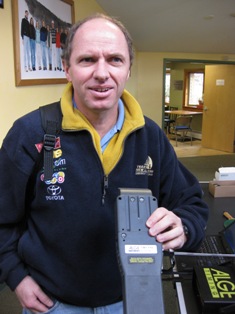
Geoff Elder visited the VARA Clinic at Killington Mt. School today.
He is shown here showing off the TIMY that he used to create the USB interface.
TG users are encouraged to try the USB interface as soon as possible. The oldest TIMY yet interfaced is from 2003. The first one sold in Vermont was in 2001 to the Suicide Six Ski Club.
NASTAR users will of course have this feature in their new software as well.
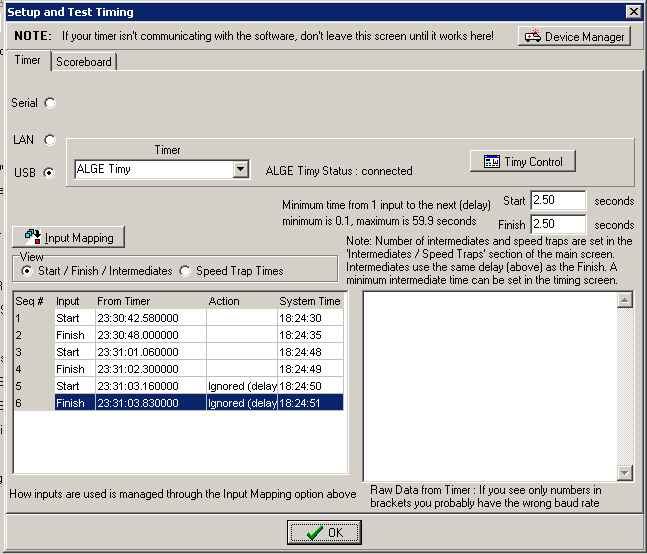
Make sure that "Timer" Serial port is set to "None" if using the TIMY - USB option. You will end up canceling the ability to output to a Scoreboard with a USB > Serial adapter if the Scoreboard is set to the same Serial port as the Timer. While this is not an acceptable option anytime, the "USB" setting obscures the Serial drop down so you have to go back and check it.
Posts: 1056 | Location: Trexlertown, PA, USA | Registered: September 10, 2002
I'm having connectivity issues with the latest SST 6.08 rev 3. The Timy isn't recognized by the software. I have updated the latest Alge driver and acknowledge Fred's comment above. Ski Club does work and National/FIS did previously. Anyone else having issues?
Posts: 20 | Location: Glen, NH USA | Registered: October 07, 2002
Put a ALGE CD in your PC. If you do not have an Alge CD, you have to download it from the Alge Homepage www.alge-timing.com. After downloading the driver, you have to extract it: press unzip 2. Connect the Timy with your PC and switch it on. Please wait until Windows finished searching for the driver. If Windows does not find the automatically, open the device manager and make a double click to ”Unknown device”. Click to „Locate and install driver”
I found the problem. The connection state did not open up automatically. Under Setup and Test, click Timy Control and Open the connection. That solved the issue. I haven't had to do this step before, as the connection was automatically recognized. I have informed Geoff, maybe he can diagnose why this happened.
Posts: 20 | Location: Glen, NH USA | Registered: October 07, 2002
There are some great suggestions here that have helped, but I still can't quite get my TIMY to communicate with Split Second.
Here are my symptoms:
1. Running Split Second Version 6.10 Revision 3
2. When I first loaded the driver from the link in SplitSecond it showed in Device Manager, but not on the Open dropdown in the USB Timy Control dialog
3. I reinstalled the driver, but no change.
4. I installed and ran the Alge COMtoFile program as suggested by @FKP and made some progress:
a. Timy1 now available in the Open dropdown.
b. Messages now includes:
Driver API Version 231
Driver Version 2.50 Build:0 Flogs:0
Connection state is undef’ed
Flash state is unknown
OnPnPConnect
ALGEUSB Version: 0.9.401
5. Timy itself reports on startup: TIMY V 0636
6. I hear an audible tone when unplugging Timy USB
7. When reconnecting Timy USB I hear audible and see in USB Timy Control dialog: OnPnPConnect
8. When restarting Timy it briefly displays USB Communication
9. Setup and Test Timing dialog continues to report ALGE Timy Status: not connected
The TIMY will not communicate with ComToFile using USB, but it is working with SplitSecond in serial mode. However, I've dug myself a little deeper into trouble since my last post.
I started suspecting that the firmware on my TIMY was too old to work with the USB driver. I went to the ALGE site and downloaded timy.bin from the download link called "Flash update V09.B5 from 2009-11-24"
I then downloaded the program called "InstallManger (Via RS232)". I went to the tab called Firmware then clicked the link "Install Firmware from File" (thinking it would then prompt me for timy.bin). After selecting the serial port for my Timy, the update began and displayed a bold red message "Clearing Firmware" (or something very similar). After a minute or so, the red message changed to "Programming Device..." and I was prompted to "Please choose update file".
The big problem now is that the dialog is looking for a file called "UpdateDateien.exe" not timy.bin.
I don't know where to find this program. I've tried looking for it on my ALGE CD, but my computers cannot read the disk (ugh!).
So, at this point I am afraid to move backwards and reset anything for fear that I've already cleared the firmware on the TIMY. And, I don't know how to move forward without this program.
No worries -- problem solved. I restarted the TIMY and reloaded firmware from the internet using InstallManager and all is well now.
My hat's off to the guys at ALGE. Even though I reset in the middle of a firmware update, the device restarted to a state where InstallManager could still communicate with it. I also need to thank Fred Patton over at Phoenix Sports who assured me that I could safely reset the device. I write software for a living and have worked with a lot of embedded systems and resetting a device is the middle of a firmware upgrade is often the time when the device is most vulnerable and likely to become a useless brick. I was very pleased that the software was robust and coded to handle this scenario.
A question from a new member: I had the same problem as you. My ALGE Timy status is now: connected, but when I start a racer on the Timy, the time doesn't appear on Split Second. Any idea ?